

- Rapid Prototyping
- Non-Technical Users
- All-in-One Platform
- Templates and Examples
- Iterative Product Development
- Lack of Granular Control
- Vendor Lock-in
- Misunderstandings
- Steep Learning Curve
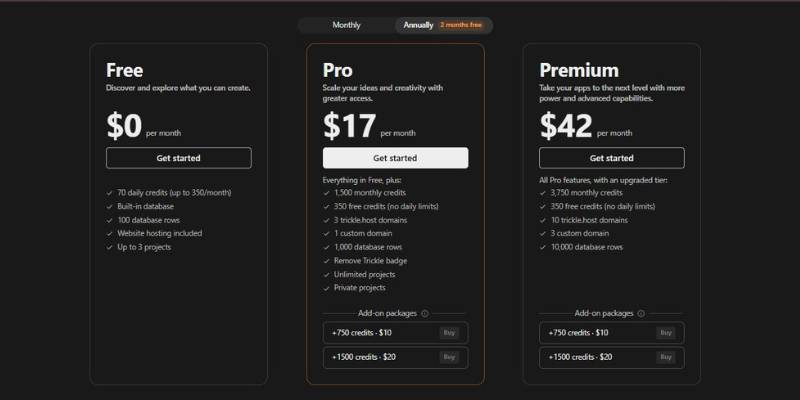
Trickle AI App Builder Pricing
Overview: What Is Trickle AI App Builder?
Trickle is a no-code app and website development platform that utilizes AI to help users create digital applications. Essentially, users can specify anything from a simple internal tool to a complex web application in everyday language and Trickle’s AI will create a fully functional application, complete with a database, interface, and workflows that can be customized and deployed. The platform includes a visual editor, natural language interface, and baked-in hosting capabilities to allow users to concentrate on creating software without worrying about the underlying technology.
Use Cases for Trickle
- Prototype a business tool in minutes
You’re a small team and you need to manage clients, projects or support requests. Instead of finding a developer or struggling with Excel or Google Sheets, you describe to Trickle what you need – fields, views, and rules – and it generates a working tool with forms and tables. This results in a custom-built business application that gathers fragmented tools and automates repetitive tasks – and gives you back a few hours a week. - Create a landing page or website without code
A freelancer or entrepreneur validating a new idea can tell Trickle the site they need (e.g., portfolio, product landing page, event sign-up page), and the tool will create the layout, placeholder content, and responsiveness, ultimately delivering a launchable site faster than you can create and configure templates in a traditional site builder. - Client-facing tools with logic and data
Say you’re teaching a workshop and you want a registration form with conditional logic (say, price varies depending on type of participant), along with a dashboard of the responses. Trickle lets you build forms, workflows and dashboards on top of a real data source, and voila, you have a tool to share rather than a form and spreadsheet. - Instantly refine concepts in natural language
During the early phases of a product, requirements change or are iterated. For instance, in Trickle, you communicate the change (for example, “add task priorities and a filter by due date”); then, the platform implements the modification in the application. Because refinement is conversational, the deliverable (a working application) remains up-to-date. - Build immersive experiences and stories
Beyond the business apps templates, some users have leveraged Trickle templates to build interactive stories, choose-your-own-adventure type stories or showcases. By combining AI-generated content with logic and UI elements, you can create an engaging experience that feels custom-made without having to manually write every line of code.
In all cases, Trickle is the right choice because the emphasis is on getting a functioning product live as fast as possible – be it a tool for your team, a website for your users, or an immersive for your audience – without needing any coding knowledge.
Is Trickle AI App Builder Right for You?
Trickle is ideal for individuals and teams who need to create digital products without coding, but where speed and convenience are prioritized over technical customizability. Since it produces apps, websites, and forms through natural language and visual prompts, Trickle is best used for quick, low-fuss solutions.
Non-technical founders and small business owners
Trickle empowers you to build a landing page, an internal tool, a simple application or a form without any programming knowledge. Describe the desired functionality with a series of conversational prompts.
Those who need to build prototypes or MVPs quickly
If you require a proof-of-concept, or a test version to be released to the market quickly, Trickle can get you something concrete in a matter of hours, not weeks. In cases where you want to receive some early feedback and are able to pivot based on the user’s experience, Trickle will be of assistance.
Teachers or content creators who are trying out digital tools
For example, in a workshop setting or as part of a classroom assignment, or even just on a side project, it’s easy to get started building an app.
Small-to-medium-scale internal business use cases
When you need a dashboard, or client intake form, or a simple automation tool for your team, Trickle can deliver it without needing to ask IT to dedicate a developer to it. And it’s nice to have a database and deployment baked in for end-to-end management.
When It’s Not Such A Good Idea
- Applications with complex logic and customization
If you have unique UI requirements, complex business logic, or heavy integration with an engineering workflow, it might be a better idea to stick with a traditional tech stack or a low-code platform geared toward developers. They typically allow more direct manipulation of code and performance. - Larger teams with existing tech infrastructure
If your company already has a particular backend stack, database, or source control flow you prefer, you may want to look into tools that can be integrated with those tools (like codebases that can be exported, or GitHub integration) rather than a fully managed, all-in-one solution. - Enterprise-grade applications with strict compliance or scalability needs
You will probably be better off with a platform that allows more fine-grained control of, and insight into, your infrastructure, rather than a general-purpose AI platform. (Note that there are many nuances to every enterprise customer’s requirements.)
In summary, Trickle is a good fit for individuals and small to medium sized teams that are looking for speed, simplicity, and shipping applications with as little code as possible. It is a less good fit for teams that need a lot of technical customization, or that are deeply integrated into an advanced engineering infrastructure.
Trickle AI App Builder: Overall Verdict
Trickle is an AI-powered app builder that aims to help users build apps and websites based on their ideas, without writing a line of code. Unlike conventional builders that start with a template or setup, you start with your idea, describe it, and go through a set of refinements, visual editors, etc., to get your desired output. It’s all about getting the output as soon as possible, be it a prototype, an internal tool, or a production-ready app.
Throughout this article, I have mainly used two words to describe Trickle. Speed and Accessibility. These are also the cases where Trickle excels. When it comes to speed, prototyping, MVPs, and small-medium-sized businesses that want to save on development time, rather than technical configurations, Trickle does a fabulous job. It also helps non-technical people build apps and tools while saving on the development time required to build an MVP.
However, if you need custom features that aren’t easily replicable, or if you need better control of the infrastructure, or if you need to integrate multiple external services, then it’s better to look elsewhere. Maybe conventional development methods are the way to go, or maybe you need builders with more flexibility.
In conclusion, if you are looking for speed, simplicity, and validation as soon as possible, then Trickle is an ideal choice for you. But if you need more fine-grained control over the app, or if you are an enterprise customer that needs heavy customization, then it’s better to explore other options.

