

- Instant natural-language apps
- Native mobile output
- Lower entry barriers
- Rapid iteration and live testing
- Less control over granular behavior
- Reliability
- Support and workflow friction
- Coupling with the platform
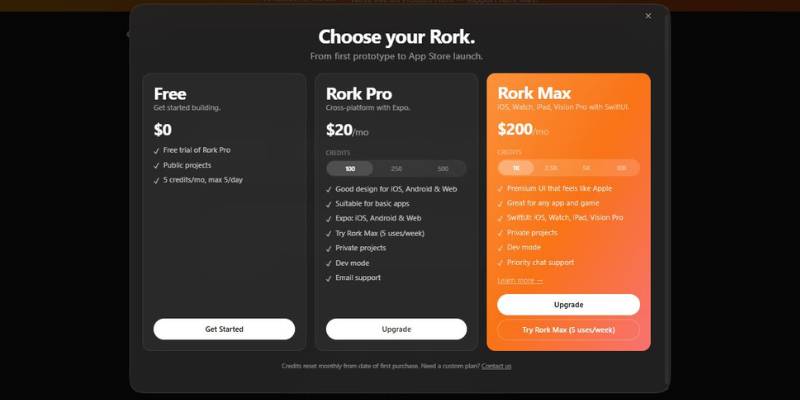
Rork AI App Builder Pricing
What Is Rork AI App Builder and How Does It Work?
Imagine you’re a solo founder named Sam, and for the last two months you have been designing an app idea on napkins, Notion and post-it notes, and you want to test the idea with users or investors but you can’t write code and you can’t afford a developer, and drag-and-drop builders don’t solve the logic and navigation problem for you either.
One day you stumble upon Rork (rork.com), a tool that lets you build a native mobile app by describing what you want your app to do, in plain text. For example, you tell Rork “I want to build a habit tracker with a screen where users can set daily goals and reminders, and a chart to view progress over time.” and Rork will build a native mobile app for you based on your description.
What this means in practice is that you integrate Rork into your workflow and let the AI build the screens and navigation and logic for your app. With the first prompt you can create a first version of the app, and test it on your phone with a QR code, refine it with follow-up prompts and iterate, all without writing a line of code.
Since Rork creates native iOS and Android apps (built with React Native and Expo), the end result is a native app, not a prototype that only works in the browser. This means that as a solo founder, you can now validate your idea in a matter of minutes, play around with features interactively on your phone, and even generate a build that is ready to submit to the app store, all without having to learn how to code.
What You Can Create with Rork AI App Builder
When to use Rork and other AI app building tools? When you prioritize speed, trial-and-error, and ease-of-use over low-level technical details. Here are a few real-world use cases to illustrate where Rork can be applied.
1. Prototype for Early-Stage Startups
One example is a solo founder who has an idea for a local marketplace app, but hasn’t yet found a technical co-founder. Rather than showing potential users a slide deck, they use Rork to specify some of the key elements of the app – like user profiles, listings, messaging, search filters, etc. – and then quickly get a working prototype that they can put on their phone and show around.
Rork’s purpose: It serves as a “fast prototyper.” It doesn’t supplant later engineering work, but it does help verify the appetite for an idea and iterate on it before you build something fully out.
2. Internal tools for small teams
A small marketing agency wants an internal application to manage tasks and approvals for campaigns. Historically, they’d have to build a mobile application (hire a developer or use some other bloated platform).
A member describes the workflow in words using Rork: a task is created, a deadline is set, and an approval is requested. The finished app is an intentionally-limited, in-house tool that meets the needs of the agency.
Rork’s purpose: It makes it easier to build small one-off internal tools, for example, which don’t merit a full-fledged build.
3. MVP Testing for Product Ideas
For instance, a product manager may have an idea for a specific niche application (e.g., a daily language learning challenge) that they’d like to validate before allocating engineering resources to it. Instead of putting it on a crowded roadmap, they create a separate Rork app.
They release the test version to a limited number of users, gather feedback, and track engagement.
What Rork does: Allows for MVP (minimum viable product) testing without taking away from the core development team. Rork does the layout, navigation, and basic functionality so that testing can occur at a more rapid pace.
4. Teachers and Workshop Leaders
The use case: a teacher is offering a workshop on startups and would like her students to feel that they’ve “coded” an application. The caveat: the majority of the students are non-technical.
With the students filling in a template describing an app, the teacher can then use Rork to make the app in front of them.
Rork’s purpose: Used as an educational aide to teach product logic and UX principles without needing to know how to code.
5. Side Projects and Personal Utilities
Someone wants a habit tracker that is custom-made for their habits. Other apps are too extensive or not applicable to what they need.
Together with Rork, they create a lightweight, purpose-built tool – daily check-ins, reminders, and some simple tracking – tailored to their specific process.
Rork’s purpose: A tool that helps people create their own bespoke applications when they can’t or don’t want to learn to code a full-fledged application.
6. Pre-Investor Demonstrations
But, if a startup is going in to meet with investors, they need a deliverable. Not wireframes.
They use Rork to generate a mobile prototype that showcases user journeys and behaviors. Although the prototype is not production-ready, it explains the desired functionality better than a static mockup.
Rork’s purpose: It facilitates the leap from idea to proof-of-concept, allowing founders to articulate their vision more effectively.
Final Thoughts on Rork AI App Builder
What is Rork good for? In general, it’s useful for gaining momentum when you don’t have the time or means to create a mobile app the “traditional” way, e.g., as a founder who wants to validate a concept, as a PM who wants to get an MVP to users, as a teacher looking to illustrate a concept, or as an individual building a simple app for yourself.
What is Rork good for? In general, it’s useful for gaining momentum when you don’t have the time or means to create a mobile app the “traditional” way, e.g., as a founder who wants to validate a concept, as a PM who wants to get an MVP to users, as a teacher looking to illustrate a concept, or as an individual building a simple app for yourself.
- You might want to use Rork if you want to quickly validate an idea before deciding whether to hire a development team
- You need to get a prototype working to show to users or investors
- If you’re happy to iterate on your application by tweaking input text and the results match your expectations
- And if your app doesn’t have many complicated logical components, then you’re a good candidate for Rork
Use something else if you need something heavily custom or if you need a lot of control over the backend, or if you need to meet some kind of performance or security or regulatory requirements right out of the gate. You might also want to transition away from Rork if you’re looking to build a production-level application for the long term.
In general, Rork is great for rapid experimentation and validation, but if you need to iterate on your application and you have specific requirements, you might find it easier to just build the thing yourself.

