

- Able to produce images and videos based on text prompts
- Offers a variety of prompt types (text-to-video and image-to-video
- Videos as visually cohesive and cinematic, with smooth motion and a story arc.
- Offer a variety of styles and produce 1080p video
- Reference points require users to upload photos or videos
- It doesn’t always deliver results that perfectly match the text or visual prompt
- Licensing and legal issues with certain versions
- Quality or speed of the platform can vary
Understanding Seedance AI Image Generator and Its Purpose
You may be frustrated with either the existing AI image or video generation tools. They are either hard to use for new starters or not enough for pro users. Inconsistent results, lack of details, or shaky frames in videos, and different tools to accomplish a full project. These problems lead to fragmented and time-consuming workflows.
Seedance is an AI image and video generation tool that aims to unify all tools together. It has text to image, image to image, text to video, image to video tools that work together in the same workflow. It also has style and output controls to make the tools work more accurately while still accessible to new users. In general, Seedance simplifies AI-based content creation and make it more consistent.
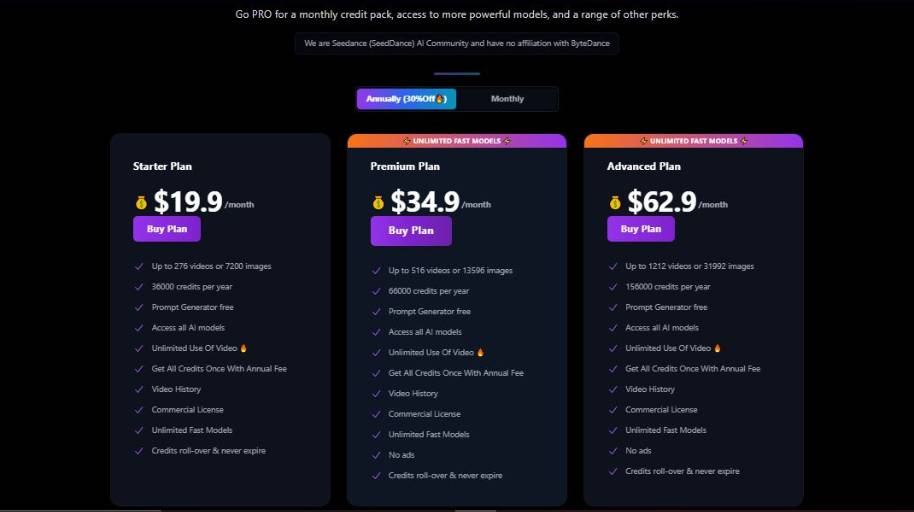
Seedance AI Image Generator Pricing
How Seedance AI Image Generator Can Be Used
Seedance is a versatile tool that can be used by anyone in different ways. Here are some examples of who uses Seedance and how:
Content Creators & Influencers
They use Seedance to create content, post thumbnails, or to get inspiration for new content. It is usually their go-to tool when they need to visualize an idea quickly.
Marketing Teams Marketers
They use Seedance to create visuals for their campaigns, ads, blog posts, or social media content. They use it to visualize ideas quickly before deciding to invest time in creating the actual design.
Small Business Owners
Owners who don’t have an in-house design team use Seedance to create promotional graphics, product mockups, or other branded content without the need for a photoshoot.
Educators & Trainers Educators
Use Seedance to create custom illustrations for their presentations, courses, or any other learning materials when they are unable to find the right stock image.
Writers & Bloggers
Writers use Seedance to create featured images for their articles, or illustrations to support their writing and make it more engaging.
Design & Product Teams
Sometimes design teams use Seedance during the conceptualization process to quickly visualize ideas before designing the final product on a professional tool.
Startups & Founders
Founders use Seedance to create mockups for their pitch decks or landing pages when they need to move fast.
Seedance helps in speeding up the content creation process for all of the above use cases, however, for teams requiring detailed professional designs, Seedance is usually used in conjunction with other editing tools.
Closing Thoughts on Seedance AI Image Generator
Ultimately, Seedance is a good choice for anyone who wants to create AI art without the need to juggle various applications or labor over a production process. It’s an excellent choice for anyone who needs to move quickly and appreciates convenience.
The fact that you can create art based on text or reference images in the same application means that Seedance lends itself well to brainstorming, social media graphics, rough drafts, and even just exploring a concept.
For a lot of people, the interface is intuitive, and the myriad of generation options means that there’s less of a learning curve involved. Its primary drawbacks are when you need to have more control over the outcome. As with any AI art, the results are only as good as the prompt. And depending on your project, you may need to go through several rounds before you get what you want.
Likewise, anyone who works in heavily regulated industries (or works with clients) may want to dig into the licensing details before relying on Seedance. In general, Seedance is great for anyone who values convenience and speed over granular control.
It’s a great tool for ideation and content creation, but if you need absolute control over every detail or to guarantee precise results for clients or production, you may want to have other editing applications at your disposal.


