

- Ease of Use (Beginners & Casual Creators
- Multi-Purpose Creators (All-in-One Creation Tools)
- Templates and Effects (Social & Marketing Use Cases)
- Free tier (Cost-Sensitive Users)
- Lack of Advanced Customization (Pro Users)
- Inconsistent Quality (Professional Workflows)
- Internet Dependence & Web-Only Workflow
- Some of the advanced features, higher export resolutions, and commercial license might not be accessible on free plans
What Is MindVideo AI Image Generator and How Does It Work?
There are many platforms that use AI for image and video creation. However, these platforms have their own limitations. For example, some of them can only create images but not videos. Some of them cannot maintain the same style for all the frames of the video. Some of them have a big learning curve and some of them offer different features as separate subscriptions.
MindVideo comes in as an all in one solution to these problems. It is a web-based platform that can create images and videos from text. It can animate an image or morph one image into another.
It has multiple AI models that can create a wide variety of images and videos. It makes the process easier for those who have great ideas but are not skilled enough for image and video editing. It can create images and videos without the need of installing different software for different purposes.
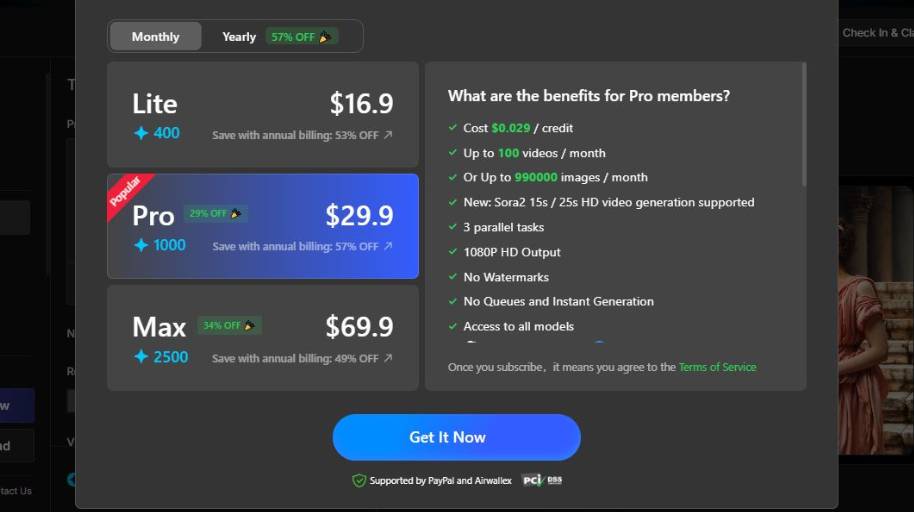
MindVideo AI Image Generator Pricing
Who Should Use MindVideo AI Image Generator?
The target users of MindVideo are people and organizations that need to produce visual graphics in a fast manner, without having to know how to design. It’s perfect for YouTubers, marketers, entrepreneurs, bloggers, teachers, and everyone else that want to convert their thoughts to images using a simple text. If you value speed, comfort, and practicality, then an image creation tool like MindVideo is a must.
For instance, marketing professionals can use it to create graphics for social media, ad creatives, or blog posts. Entrepreneurs can create advertising graphics without having to schedule a photoshoot. YouTubers and bloggers can produce featured images for their articles or quick sketches. Teachers and educators can create specific graphics to use as visual aids, when they are unable to find a photo that describes the concept they are trying to convey.
As I mentioned above, you can use an AI image generator like MindVideo in the early stages of your projects. Some designers and product teams use AI image generators to conceptualize their graphics and establish a direction of the mood board, before moving on to the actual design in a professional tool.
However, there are some cases where you may not want to use a platform like MindVideo. Probably, graphic designers, marketing agencies, and large organizations may want to have more control over their image production and will prefer to use professional tools to create their graphics.
Those that need layered designs, precise vectorial control, or massive editing capabilities, may want to look for a different solution. For example, if you need to produce complex graphics, large format designs, or print materials, you will probably need a more advanced tool.
If you are looking for a tool to produce fast AI-made graphics for digital, then MindVideo is your go-to option.
Final Thoughts on MindVideo AI Image Generator
In summary, MindVideo is ideal for you if: You are looking to create images quickly and aren’t wanting to learn complicated graphic design software. You want to create digital content, such as blog graphics, social media posts, concept art, and ideas.
You value speed and simplicity over ultimate control. It is also useful for creating mockups or initial ideas which can then be exported into graphic design software for final editing.
Creating images for short-term online campaigns. What’s next? If you’re looking to create images quickly and easily for digital purposes, then MindVideo is the best choice for you. If you are looking for more technical editing capabilities, and total control, consider using graphic design software.


