

- Fast, Simple Video Creation
- Ideal for non-professional creators
- Multi-mode generation
- Fast and good
- Inadequate scope of customization
- Limitations of the free tier
- Specific use cases
Understanding MindVideo AI Avatar Generator and Its Purpose
MindVideo is a web-based artificial intelligence video creation system. It’s a service that takes the provided text and image inputs and creates a final video file. For our use case of virtual avatars, that means it takes the digital picture and either typed or uploaded speech text and uses artificial intelligence to generate a video in which the pictured person talks to the video’s viewer. The goal of the service is to help you to generate video clips without requiring any technical background.
The process of using MindVideo
User input for avatar functionalities on MindVideo involves a set workflow of providing necessary assets and receiving an animated output. MindVideo uses the user-provided media assets and directives as prompts to generate multimedia content.
The first step is to select the right tool on the MindVideo platform and upload the original image, which will serve as the visual representation of the avatar. You can use a picture of a person, an illustration of a character or an animal, and the platform will understand that this is what your video is about.
Once the image is selected, you set up the dialogue or narrative. You can upload an audio file that will be your voiceover, or enter text into the system. If you don’t supply an audio file, MindVideo has a text-to-speech function that will generate a spoken audio clip based on the text you enter and the voice and language you choose.
With the inputs for the visual and audio elements, the AI in MindVideo then attempts to link the two. Using smart lip-sync and facial animation, the photo will look as though it is speaking along to the voice, either one you input or one that’s been automatically generated. The model will look at the face in the photo, and determine what the shape of the mouth and other features should be to match the audio.
If you want more control, you can add text prompts that customize the way the avatar responds, for instance changing the tone from happy to serious, adding in a camera zoom, etc. before the animation is rendered.
After the video is created by MindVideo, you can preview it inside the browser and make adjustments if needed, by going back to the script, changing the audio or tweaking the emotion. Once you are satisfied with the video, you can share or download it. The process of: input → text → rendering → editing → output enables you to do quick edits without having to leave the software.
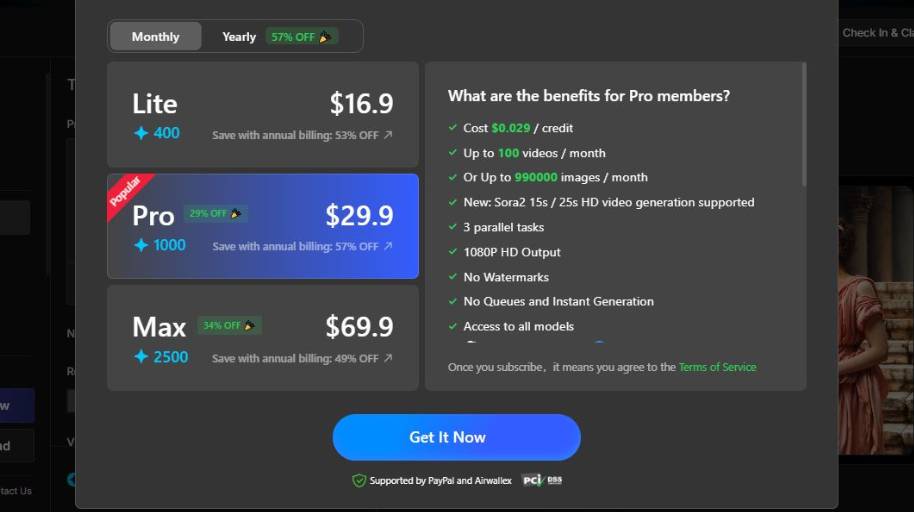
MindVideo AI Avatar Generator Pricing
MindVideo AI Avatar Generator in Real-World Scenarios
When considering MindVideo from a Casual to Regular to Enterprise user, I think MindVideo would be used very differently depending on the scale and scope of the project. MindVideo was built to be easy to use and fast to produce, so I would say it would be more suited to smaller usage needs. However, it can still be used for larger or Enterprise applications with a bit more planning.
Casual Use
Casual users (YouTubers, teachers, hobbyists, etc.) who only from time to time need an animated avatar video, can use MindVideo as a one-off tool. They usually login when they need to make a video (often short) for a Facebook post, lecture or whatever.
Every now and then: a single image is uploaded, a short text or voiceover is added, and a talking avatar is produced — all in a single session. No integrations or connections with other platforms are required, no extensive learning is needed. In this scenario, the output is more important than quality — and MindVideo’s platform does the job.
Frequent Consumption
Casual customers, like social media managers, small business marketers, or online teachers, on the other hand, tend to use MindVideo on a more regular basis, as part of their ongoing content calendar. Here, MindVideo serves as a tool used over and over again.
In this scenario, users tend to perfect their content, and make templates or follow a format to make sure their series of videos look and feel consistent. They may also be scripting several videos at a time, and organizing production and upload dates, etc.
MindVideo is fast enough to accommodate a daily (and certainly weekly) cycle of video production, without the need for time consuming preparation. In this case it’s important for users to become familiar with the interface controls, voices, and scripting methods to help them become as productive and consistent as possible.
However, for frequent users, they might have some restrictions when they have more advanced production requirements. For instance, they might need to export the output video from MindVideo and import it to other editors to edit the video further. Therefore, frequent users often use MindVideo in conjunction with other apps.
Commercial use
An exception to this is where a user is within an enterprise marketing department, or a production company or content producer that creates video at a high rate, where MindVideo will form part of an automation workflow for instance, and may require more videos to be generated automatically rather than manually, and more uniformity in the templates used, and perhaps an integration into a content management or digital asset management system for example.
In this scenario, it’s important to maintain consistency. You may want to use uniform character graphics, scriptwriting styles, and even voice styles to maintain branding for say, 1000s of videos. It’s possible you still use the MindVideo online editor to create the first draft, but for mass production, you want automation, API access, or even batch processing capabilities. If available, you might want to leverage APIs, perhaps a scheduling software, or a script to automate the input and output workflow.
Plus, quality control is institutionalized: videos are edited, revised, and even mixed with other media using professional editing tools. In this scenario, MindVideo serves as a content generation engine that is but one part of a multi-step production process, not the only means of delivery.
Closing Thoughts on MindVideo AI Avatar Generator
Select MindVideo when you need a straightforward tool for fast and beautiful video creation with minimal input and tech literacy required. MindVideo stands out for converting text, images into animated videos in a short time with a simple interface that is friendly even to new creators. Consider this choice for social media videos, marketing videos, fast presentations, or explainer videos.
MindVideo is excellent for supporting multi-format input and delivering finished videos in a short time. With that, it is an ideal tool when your goal is to make a fast video. It is also a good pick when you wish to produce content that needs frequent video updates. Why not MindVideo? Select another tool when you need deep video customization or high video quality.
These are ideal for applications where the quality of the video matters. Use a tool with a more advanced editor for producing videos with high editing needs. Consider a video editor or API integration when you need a high-end editing feature for advanced video customization.
In particular, look for APIs when you need to integrate video creation in a production pipeline. APIs have all the functionalities of the interface and are an ideal choice for automating processes like video creation.


