

Main Features You Get with GPTZero AI Grammar Checker
Understanding GPTZero AI Grammar Checker and Its Purpose
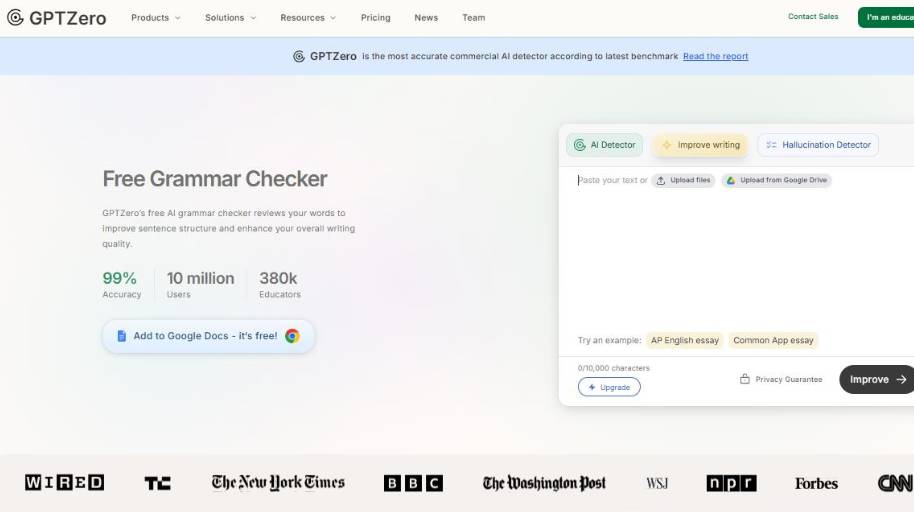
So, what is GPTZero? Essentially, it is a grammar-checking tool that is AI-powered. Simply put, you insert your text into GPTZero, it will check your grammar and suggest alternative wording to make your writing more fluent and accurate. So, you can think of it as a tool you can use to proofread your writing.
This is something that students might use before handing in an essay or an assignment to check for any grammatical errors. A business owner might use it to proofread an email, a proposal, or a report. A blogger might use it to proofread a blog post before hitting publish. Or, a job applicant might use it to proofread a resume or cover letter.
In all of these use cases, GPTZero can be used because it offers a very functional value. It checks for grammar. It makes sure there are no typos. And it helps you sound professional.
Advantages and Disadvantages of GPTZero AI Grammar Checker
Top Alternatives to GPTZero AI Grammar Checker
With all of these grammar checking choices, you may want to consider them on a continuum from quick and easy to fully customized. Depending on your needs, you may prefer the ease of use offered by one or the greater flexibility offered by another.
Simple and Intuitive Tools
The tools at the “automation-first” side of the spectrum give you the easiest, fastest, analysis and editing with the least amount of effort required from you. They offer one-button grammar checks, suggested fixes, and friendly, simple-to-use interfaces that don’t need much setup. If you’re a writer who just wants to get a simple, quick review of a document (like a student with a paper, or a businessperson editing an email), these tools take some of the hassle out of the process and provide more direct recommendations without cluttering up the interface.
Here’s why that’s a big deal:
- Less setup also means less time spent learning how to use the tool.
- At the same time, assistive suggestions allow users to apply quick fixes for grammar, clarity, and other issues.
- Most interfaces are user friendly and can be used by anyone regardless of experience.
Other Useful Tools (Primarily Offering More Customization and Control)
On the opposite side of the coin, there are services that provide more advanced options for adjusting grammar and style analysis. Some may provide the ability to customize stylistic rules, set individualized language options, or integrate with other editing tools. Some allow more detailed tone, audience, formality, and spellings (e.g., -or vs -our) settings. They are commonly used by professional editors and writers and by groups with in-house stylebooks or additional quality requirements.
Why this is important:
- Customization enables compliance with your company or publication guidelines.
- With advanced control you can customize the feedback to the specific writing task.
- We can integrate with existing content workflows or editorial systems.
What’s GPTZero for?
GPTZero tends more toward the simple and automated end of the continuum. Though it does give you some feedback about grammatical and style problems, it is intended to give clear feedback with a lot of automation and little input, and so will be less targeted for specific and specialized revision.
Picking the Best Option for Your Needs
- If what you need is rapid, automatic feedback that requires little setup—say, to hone your everyday writing or when writing for a general reader—then simpler, user-friendly tools such as GPTZero may serve you best.
- If you need to conform to a particular style guide, have highly specific formatting requirements, or are working as part of a larger publishing process, you might prefer a different solution that offers more flexibility and control.
Approaching the problem in terms of simplicity and control should help people pick the grammar tool most suitable for their writing requirements and work style
Is GPTZero AI Grammar Checker Right for You?

Those that want clarity on AI-generated content, and a simple, programmatic, interface that gives them a signal for authenticity and originality, are perfect for GPTZero. GPTZero makes the most sense in contexts where transparency matters.
Good Fit for GPTZero:
- Educators and Academic Institutions
Teachers, professors, and academic administrators that suspect that students may be turning in AI-generated work can use GPTZero to give them a better sense. It’s a good starting point to talk about authorship, citations, and how to properly use AI.
- Students Seeking Writing Feedback
Students that are checking their work before turning it in, can use GPTZero to see how AI detectors may see their writing. They can also use GPTZero to find places where they may be sounding too formulaic, or too machine like.
- Editors and Content Review Teams
When working with multiple authors, content managers, publishers and editors can use GPTZero to check a piece of writing, to see if there is a good signal that it’s authentic. This is particularly important in places where it matters for compliance, or matters to a brand.
- Organizations with AI-Use Policies
Companies, non-profits and institutions that have policies on AI-generated content can use GPTZero to enforce those policies.
Final Consideration
Ultimately, GPTZero is best used as a secondary tool. There are other tools that will give you more comprehensive grammar checking, more comprehensive plagiarism detection, and even better AI writing assistance. If you need all of those, you should use one of those. But if you need a quick, simple, programmatic tool to give you a better sense of whether AI is in play, GPTZero can be of service.
Closing Thoughts on GPTZero AI Grammar Checker
In conclusion, whether you should use GPTZero or not depends on your requirements.
If you desire more information on AI-assisted writings, for any purpose, whether educational, publishing, or professional, then GPTZero is a great secondary tool to use. In addition, if you require openness in your space or wish to check how your work will be perceived by other AI-detecting tools, then this is a great option for you. If you are a student, teacher, or publisher, you can use this tool to check a piece of writing before submission or publication.
However, if you are looking for superior grammar check, in-depth suggestions for improvement, superior plagiarism check, or looking to create bulk content, then GPTZero is not the best tool for you. In this case, you should look for tools that serve the exact purpose you need.
You should take a minute to assess what you are looking for and if what you need is to determine if AI has been used in a piece of writing or some level of proof-reading, then GPTZero is a great option for you. However, if you require any other service, you may want to check other alternatives.


