

- Quicker First Draft
- Multiple Content Type Support
- Ideation and Content Development
- Ideal for: Writers with a case of the dreaded block, startup founders in their infancy
- Assists in Sustaining Writing Flow
- Needs editing from a human
- May Not Have Extensive Subject Knowledge
- Not a Complete Content Strategy Platform
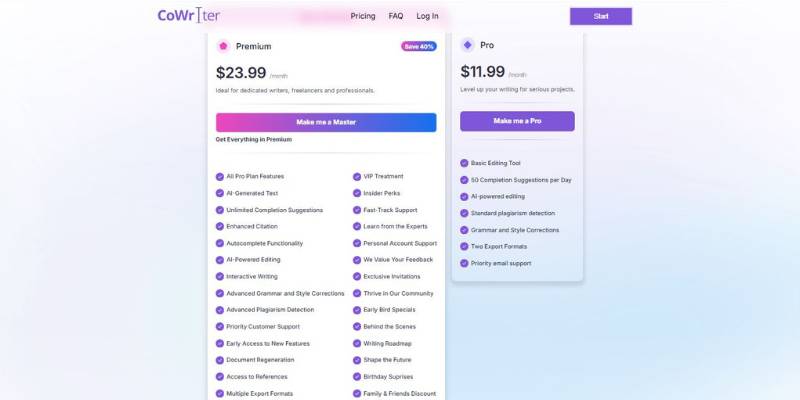
CoWriter AI Content Creator Pricing
What Is CoWriter AI Content Creator and How Does It Work?
What problem does it solve? As a solo founder of a small eCommerce brand, on a Sunday evening, you still have to write a product launch email, 3 product descriptions, and an outline for a blog post for the following week. You have an idea of what you want to write, but the blank google document is holding you back. You don’t need a full-fledged marketing team, you just need some help in getting your thoughts down in a somewhat coherent and edited manner, faster.
That’s where CoWriter comes in.
What does it do? CoWriter is an AI-powered content generation tool that assists individuals and teams in drafting, editing and expanding their written content, faster. It’s designed to not replace your writing voice but aid you in getting your ideas down from a vague notion to a somewhat structured text, without getting held up at the starting line.
A real-world example of how this would play out is as follows:
- You start by entering a short brief or key points about your product.
- CoWriter generates a structured draft-such as a product description, email, or blog outline.
- You review, tweak the tone, adjust details, and refine the messaging.
- If needed, you ask it to expand sections, simplify wording, or adapt the content for another channel.
For the solo founder handling a multitude of content, CoWriter acts as a drafting buddy, saving you time on getting that first draft done, getting your somewhat disorganised thoughts into a structured format and suggesting different ways of saying things when you get stuck. Rather than hopping between different tools, you can use it as your go-to writing sidekick for various formats of content.
On a day-to-day basis, CoWriter can be used for:
- Blog posts & long-form articles
- Marketing emails & newsletters
- Website & landing page copy
- Social media captions
- Product descriptions
The value here isn’t just about saving time, it’s about maintaining momentum. You spend less time deciding on the right words and more time on strategy, messaging & overall quality. For content creators, marketers and founders who have to consistently generate content, CoWriter becomes a part of your workflow – Draft -> Refine -> Repurpose -> Publish.
CoWriter AI Content Creator: Ideal Users
Who is CoWriter for? Well, it can be for anyone, but how useful it feels depends on the depth of your writing and content creation tool experience. Here’s an honest rundown of how the different levels of users can make use of CoWriter and how it will fit into their process:
1. For those just starting out
Who they are: New content creators, small business owners with little writing background, students.
How they interact: One of the biggest obstacles for a novice writer is getting started with a blank page. CoWriter can support them by providing more structured templates and suggestions as they enter simple prompts. If a young writer has never created an outline or different types of writing, having some support can help alleviate anxiety and make the process more inviting.
What they get out of it:
- A clear starting point for different content types (blogs, social posts, emails).
- Help with organization, tone suggestions, and common phrasing.
- Faster turnaround when learning basics of writing.
Drawbacks to consider: Novice users may over-rely on AI recommendations, and fail to edit for tone and accuracy. Understand how to tweak and customize results, particularly when writing on behalf of a business or your professional persona.
Best for: Anyone who wants to learn and create content without having to write at an advanced level.
2. Intermediate Users
Who they are: Freelancers, content marketers, small team members who write on a regular basis.
How they interact: Intermediate users typically possess an idea of structure, tone and audience. They can use CoWriter for productivity, i.e., for creating chunks of text, getting past writer’s block or experimenting with options, but still apply their own knowledge to shape it further.
What they get out of it:
- Reduced first-draft writing time.
- Trustworthy assistance for ideas and variants.
- Consistently produce output without needing to start over.
Drawbacks to consider: the results of CoWriter should still be reviewed and edited by intermediate writers to confirm the quality of content and the extent to which it meets strategic objectives. This is a supplementary technology.
Best for: Creators of frequently published content who need a mix of speed and quality.
3. Power Users
Who they are: Seasoned writers, editors, brand strategists, technical authors.
How they interact: Experienced writers may require specific words, technical information, and a clear tone. They might use CoWriter in a focused way – say to create an initial draft, try a different approach, or cut down copy – but still have to lean on their own abilities to produce the final product.
What they get out of it:
- Fast creation of variations for internal ideation.
- I will assist with repetitive or bulk content.
- A starting point to experiment from when no manually written version is available.
Drawbacks to consider: Sophisticated users may find that the foundational results are too generic or boilerplate to effectively address very specialized or technical subjects. They will continue to require significant editing and expertise input. In some cases, sophisticated users may desire tools with more granularity and customization of voice and tone.
Best for: Writers who want to improve their efficiency in certain aspects of writing but need to fall back on their skills to ensure the quality of their output.
While CoWriter is available to all skill levels, it serves a different purpose for different users:
- What works best for beginners is structure and encouragement.
- Intermediate users have a helpful tool for improving speed.
- Power users employ it for ideas and diversification, but rely on their skill for quality.
CoWriter shines in every scenario, so long as you combine it with editing, and a well-defined purpose for whatever you’re writing.
Final Thoughts on CoWriter AI Content Creator
Whether or not CoWriter is the tool for you will largely depend on your writing style and what you need from an AI writing tool.
CoWriter is ideal for: Entrepreneurs, marketers, freelancers and smaller teams who need to produce content on a regular basis and want to save time on the initial draft of their content. Those who want the flexibility to produce multiple formats of content like blog posts, email copy, product descriptions or social media posts from the same interface. If you need a tool to help you get past your content roadblocks and produce a first draft. In these cases, CoWriter can function as a reliable drafting partner that helps you stay consistent and productive.
If you are still in the early stages of your writing journey and need a tool to help you gain confidence. Having structured drafts and idea prompts can make content creation less overwhelming and more manageable.
It is not ideal for: Content creation that requires a high level of technical knowledge, legal and medical content or content that requires a high level of brand personality. Those who want to create and publish content direct from a tool. Large teams who want to track the success of content campaigns or need a full suite of content management tools.
When to use CoWriter: When you want to speed up the content creation process and produce high-quality drafts
When to look for other options: When you need a tool with more advanced features. When you need to produce highly customized content. When you need to produce technical or legally sensitive content.


