

- Fast and Easy Content Creation
- Ease of Use and Templates
- Multiple Use Cases Supported
- Save Time and Generate Ideas
- Lack of Depth and Insight
- Not Ideal for Long-Form SEO Content
- Cost of Subscription Plan
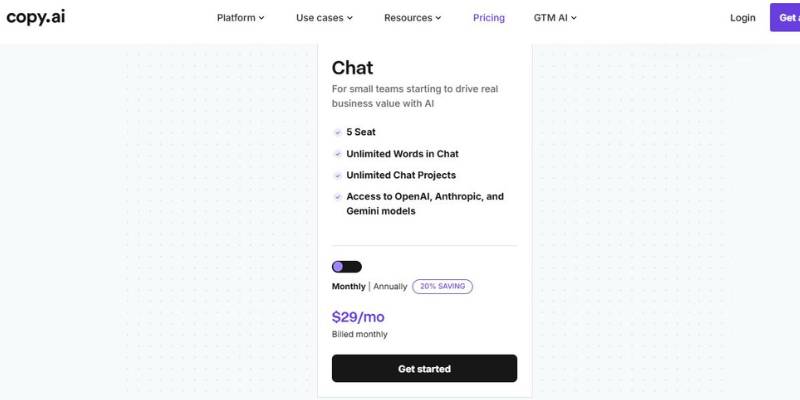
Copy.ai AI Content Creator Pricing
Introducing Copy.ai AI Content Creator: What You Need to Know
Copy.ai is a cloud-based artificial intelligence software tool that automates the process of generating written content and other GTM functions. It’s a part of the class of AI-powered tools that generate content and automate GTM using machine learning and natural language processing to generate text at a speed and scale that is impossible for a human, including blog posts, social media, emails, product descriptions, headlines, and marketing copy.
Inside this class, Copy.ai is a tool that is less of a general writing assistant, and more of a workflow tool for generating business content and automating GTM functions with AI. It offers a suite of tools (AI templates, paragraph and sentence generators, chatbot, automation, etc.) that can be used to automate repetitive writing and idea generation use cases at scale, which makes it a tool geared more toward a business or team where brand voice consistency, and speed are key.
The thing that differentiates copy.ai is that it is an automation tool, not just a tool for generating text. It is built to automate structured content creation flows like drafting, rewriting and personalization, and integrate that automation into GTM systems for sales and marketing teams. This makes it a tool that is different than other simpler text generation tools that don’t have the automation or workflow aspects.
Overall, Copy.ai is an AI-powered writing and business process automation tool that uses natural language generation to help professionals generate and refine business content quickly and integrates those tools into business operations.
Copy.ai is versatile and can be used in a wide range of contexts, from daily to sparingly, from solo use to team use, and from simple applications to more complex applications. The benefits that it offers will also vary depending on how you use it.
Copy.ai AI Content Creator in Real-World Scenarios
1. Ad Hoc Content Generation
Casual users view Copy.ai as a productivity tool. This may be a solo founder, freelancer or marketer who uses it from time to time to:
- Blogging 101
- Captions for social media
- Product Descriptions
- Emails
Examples of copy for advertising.
In this case, Copy.ai shortens the time it takes to go from idea to first draft. It’s more of a brainstorming and drafting tool rather than a mission-critical application. The workflow implications are tactical: You enter prompts, edit responses, and then copy and paste the results into your tools (e.g., a CMS or marketing automation platform).
The following are main features of casual use:
User access
- Manual copy-paste processes
- Minimal automation
- Emphasize speed and idea generation
This is ideal for those that want content assistance on an occasional basis and do not need to collaborate or have automated workflows.
2. Ongoing: Integration into Workflows and Collaboration Across Teams
Recurring Use: At this level, Copy.ai is now part of the daily/weekly workflows of the content team (or the marketing team or the growth team), and they use it as a tool to create content to push out regularly.
Common uses include:
Blogging (on-going)
These are a series of emails sent to customers or potential customers over a period of time. They could be used to nurture leads, onboard new customers, or re-engage inactive ones. There are various types of email sequences, including welcome emails, lead-nurturing emails, and abandoned cart emails.
- Landing pages optimized for search engines
- Sales outreach messaging.
- Developing copy for specific campaigns
Here, Copy.ai provides templates, style guides, and repeatable processes. Rather than individualized prompts, teams create systems or workflows of prompts.
At this level, integration of the workflow might include:
- Brand messaging frameworks that are shared.
- Collaborative editing and feedback loops
- Content Calendar Integration
Here are a few examples of batch generating campaign assets.
Instead, the benefit moves from time savings to team leverage. Copy.ai allows you to keep up with content speed without having to sacrifice consistency in tone and voice.
3. Large-Scale Use: Automation and System-Level Deployment
At scale, Copy.ai serves as a marketing automation/revenue automation stack. An enterprise or a growth company might use it to create content for many markets, products, or segments.
Typical applications on a large scale are:
- AI-powered automated content creation
- Content localization in multiple languages
- Scale sales enablement messaging
- Personalized outbound campaigns
- Content generation via automation
In this case, Copy.ai has stronger integrations with CRM tools, marketing automation tools, and other sources of internal data, and it is being used both for content creation as well as for creating additional versions of content to personalize it based on segments or behaviors.
Large-scale deployment characteristics:
Collaboration between functions (marketing, sales, product)
Another approach is to have API or automation-based workflows
4. Governance (brand controls, review processes)
Content generation at scale, with analytics.
Now, Copy.ai starts to become less of a writing tool and more of a content stack. You can start to integrate AI into concrete processes, instead of people having to interface with it.
This means that the functions of Copy.ai vary from tier to tier, shifting from tactical content creation to strategic content creation. It’s not that the technology is any different, it’s just a matter of integration and usage.
Is Copy.ai AI Content Creator Worth Using?
Copy.ai can be a good fit for teams (and individuals) that see AI as a productivity tool, not a source of expert content strategy. Specifically, it’s ideal for: marketers, founders, content managers and go-to-market teams who want to produce large quantities of content, but still want to own the results, and direct the brand’s voice.
Situations where a high volume of content is needed quickly (e.g. campaigns, email, media) is another area where this tool shines. So is using the tool for building repeatable templates.
But, teams looking for creative editing, long-form technical content, or entirely outsourced content strategy might still want to use human tools. Teams looking for content building blocks, ideas, or scalable ways to produce marketing content are a better fit for Copy.ai.


