

- Speed and Iteration Efficiency
- Accessibility for Non-Designers
- Stylistic Versatility
- Concept Exploration and Ideation Support
- Cost and Resource Efficiency
- Reduced Fine-Grained Control
- Variability in Output Consistency
- Dependence on Prompt Quality
- Limited Contextual Awareness
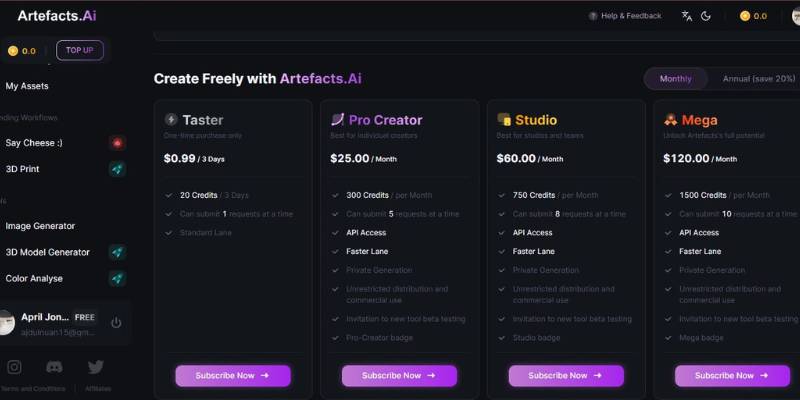
Artefacts AI Image Generator Pricing
Understanding Artefacts AI Image Generator and Its Purpose
A lot of artists, designers and developers share a common problem: How do you generate 3D assets and visuals? The traditional way of modeling 3D assets requires domain knowledge, time and effort. Even the best AI image generators only generate 2D images. What if you need 3D content, or want to create 3D assets from sketches and text? Existing solutions are either too time consuming, technically challenging or require multiple tools to go from idea to asset.
Artefacts solves this problem by offering a service to generate and edit 3D models and visuals from text or images. You simply type what you want, or upload an image, and the platform generates a preview of a 3D model or a rendered visual asset.
We solve common problems for artists, designers and developers by offering:
An easy way to input your ideas: Describe what you need in words, or upload an image. We handle the rest and generate a 3D model or visual.
Automated 3D content generation: No need to model or render anything yourself. We generate 3D models and visuals from text or images for you.
Fast previews: See what you generated in a matter of seconds, and edit it until you are satisfied.
By applying AI in the content generation process, we offer an easy way for anyone to create 3D assets and visuals from text or images. This way we bridge the process from having an idea to actually create an asset.
Artefacts AI Image Generator: Ideal Users
Artefacts is ideal for anyone who wants to create images fast and multiple times without depending on a design tool. Even though it can’t replace design tools that offer more advanced features, the tool is great for those that care about speed, flexibility and ease of use.
Here are some of the groups of people that can benefit from using Artefacts:
Content Creators and Social Media Managers
If you are a YouTuber or social media manager who needs to create lots of thumbnails, posts and ads, then this tool is great for you. You can create as many images as possible and keep testing them until you find one that converts well. You don’t have to hire a designer to create a new design every time you want to test a new idea.
Marketers and Brand Teams
As a marketer, you need to create lots of images for your ads, landing page, presentation or even product launch. Artefacts can help you create mockups, concepts or background images for your ads until you are ready to engage your designer for the final brand asset.
Entrepreneurs and Small Business
Owners Lots of entrepreneurs and small business owners don’t have designers in their teams yet. Artefacts can help them create images for their ads or website without knowing how to design.
Designers and Creative Professionals
Professional designers can use Artefacts to play around with ideas. You can create a mood board or play around with some styles to get an idea of what you want to create with a design tool.
Educators and Students
Teachers and students can use Artefacts to create concepts for their project work or to illustrate a point.
Product and UX Teams
Product managers and designers may want to play around with lots of ideas. This tool can help them to quickly create images to illustrate their points. Who is Artefacts not for? Even though lots of people can benefit from using Artefacts, it is not a tool for everybody.
Below are some of the groups of people that may not benefit much from the tool:
- Designers and artists that want to have total control over their designs
While Artefacts makes it easy to create images, it doesn’t give you total control over the design process.
If you want to create your own designs from scratch, then it may not be the tool for you.
- The algorithm may not understand certain design terminology
There are some design concepts that you may not be able to create with Artefacts because the algorithm may not understand some design terminology.
For example, you can’t create an image with a “beautiful” background because the algorithm has no idea what a beautiful background looks like.
Everybody: Lastly, Artefacts may not be a tool for everybody. You have to play around with the algorithm and understand how it works. So, you need some patience before you can master how to use it. There you have it.
Artefacts is a great tool for creating images. Even though it has its own limitations, you can create lots of images with it. The tool is great for people who want to create lots of images in a few minutes. But if you want to have total control over your design process, then it may not be the best tool for you
Closing Thoughts on Artefacts AI Image Generator
If you frequently need design “now” instead of “next week”, then Artefacts is probably a good tool for you. It’s ideal for makers, marketers, entrepreneurs and small teams who need to be able to visualise rough ideas into concrete and useful designs, such as for a marketing campaign draft, a presentation, a social media post or early product design.
It’s perfect for when the end product doesn’t need to be 100% accurate, but when you need to get an idea out, try something out, show something to someone and keep the project ticking. For most of our users, it’s not about doing final designs, it’s about speeding up the initial rough-as-guts creative process.


