

- Great for casual creators and quick visuals
- Easy to use for beginners
- Supports a variety of artistic styles
- Quick turnaround for ideas and drafts
- Good for non-designers needing visual assets
- Not ideal for highly polished or professional work
- Limited control for detailed refinement
- Credit/usage constraints may affect heavy use
- Output varies with prompt quality
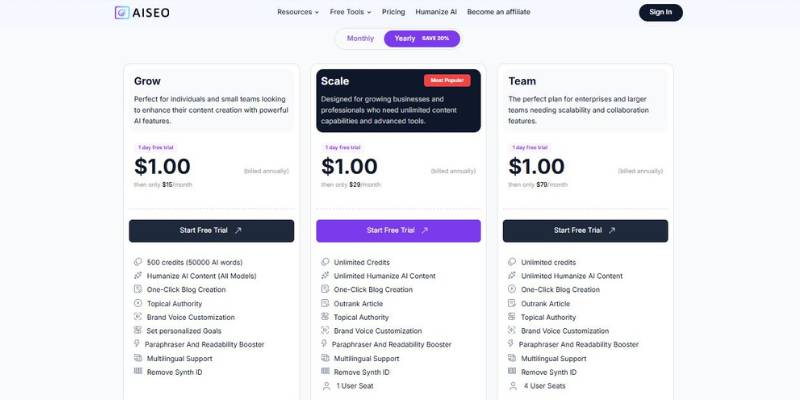
AISEO AI Image Generator Pricing
What Is AISEO AI Image Generator and How Does It Work?
AISEO’s AI Image Generator works by allowing users to input a text description of an image they’d like to generate. The AI program then attempts to create an image that matches the description. The AI Image Generator is meant for users that require images in a rapid amount of time and cannot be required to have graphic design knowledge.
Here are a few everyday, practical uses for it – and the reasons it’s a good fit for them.
1. Blog Post and Article Images
The problem is: sometimes it’s really hard to find an image that has the “feel” you’re going for. Stock photos can be fairly generic or even look posed. With AISEO, if a blogger wants an image of, say, “freelancer working late on kitchen table with warm lighting”, they can generate one that’s closer to the context of their piece.
Here, the value isn’t just image generation. It’s being able to get images that seem relevant to the subject matter, which can help make content more compelling and cohesive.
2. Fast creation of social media graphics
Sometimes social media requires quick turnaround times when it comes to graphics. With AISEO, content managers can produce campaign or trending topic aligned graphics, without having to rely on a designer.
Say a small business is running a seasonal promotion – it could create a themed background or illustration to match the message. The result is quicker delivery and more unique visuals that don’t resemble templates.
3. Using Visualization While Brainstorming
Especially when teams are brainstorming and ideating new ideas, such as for branding, narrative, or product design, it’s difficult to visualize them. AISEO enables you to create a rough prototype of your ideas.
These sketches are not the final designs. They are a tool to facilitate conversations. Sometimes, when you can visualize a thought it makes it easier to refine your direction, get consensus, or make determinations of what does and does not fit.
4. Supporting Presentations and Reports
The sorts of slides and reports that make use of generic icons and simple images could be replaced with more bespoke images from AISEO – say, a cityscape for a tech presentation, or a tranquil natural backdrop for a meditation session.
The tangible value here is to add more clarity and punch to a presentation. A custom visual can do a great job of aiding a point and making a presentation more memorable.
5. Personal Creative Projects
Not every user of AI imaging tools is a marketer or content creator. What if you have a cool idea you want to try out without needing to learn a design application? AISEO allows you to try it – whether it’s a fantasy world, a character design, or anything else you can think of – just by typing it out.
The result for hobbyists is the ability to create content regardless of their technical ability.
In general, it would be better to think of AISEO’s AI Image Generator as a utility to rapidly generate images from ideas rather than a tool to give you precise control over the design.
What You Can Create with AISEO AI Image Generator
The AISEO AI Image Generator is often employed when there’s a requirement for bespoke images in a hurry, and time and money for graphic design are not available. The following are some real-world applications and how AISEO fits into the process.
Blog & article publication
Bloggers and article writers require images for their publications. These images could be about remote work, digital marketing, travel, etc. Rather than searching for stock images and using something generic, the AI image generator can be used to create an image that is more representative of the content. In this instance, AISEO is used as a quick method to generate images to support written content.
Social media content
Social media content managers require images for social media posts. This could be for promotions, announcements, or regular social media posts. The AI image generator can be used to create images that represent the content of a social media post. This could be anything from Christmas promotions to an image that represents digital marketing. In this instance, AISEO is used to quickly generate images when there is a time constraint.
Idea generation
Business owners, digital marketers, and entrepreneurs will often have ideas for branding, products, and stories. Rather than hiring a graphic designer to create images at the idea stage, the AI image generator can be used to quickly create draft images. In this instance, AISEO is used to quickly generate ideas.
Small business promotion
Small business owners will often require quick images for promotion. This could be a banner image for a website, a background image for a web page, or an image to support an email promotion. Rather than hiring a graphic designer for every small change, the AI image generator can be used to quickly create images that support a promotion. In this instance, AISEO is used as a tool to quickly create promotional images.
Education
Teachers and presenters require images to support their educational content. Rather than using generic clip-art style images, the AI image generator can be used to quickly create bespoke images that represent what is being taught. In this instance, AISEO is used to create images that help support the learning process.
In all of these use cases, AISEO is not intended to replace a graphic design application. It’s intended to be used quickly to create images when the requirements are not too complex.
Final Thoughts on AI Image Generator
AISEO is the right tool for you if you need images for your blog post, presentation, or social media post and you are in a hurry. If you are a blogger, marketer, small business owner, or online content creator who needs images that represent the content you create, and you don’t want to spend a lot of time designing, AISEO can help you create images in just a few minutes.
Use AISEO if:
- You need an image for your blog post, presentation, or social media post.
- You are not a designer.
- You need a simple and quick solution for creating custom images.
However, if you need more detailed editing, advanced features, or branding, you might consider other tools. For example, if you are a professional designer or part of a large team that is looking for creating print-ready graphics, designing campaigns, etc., AISEO might not be the tool for you.
Summing-up, if you are looking for a simple tool for designing images from text descriptions without much effort, give AISEO a try. If you need more advanced features, detailed editing, etc., you should consider other tools.


