

Quick Video Production
- Easy to use
- Flexibile
- Help with script improvement and visual optimization
- Versatile
- Basic Voiceover and Localisation Options
- Potential for generic output
- Limited editing capabilities
- Limited Templates
- Bugs
What Is Vigi AI Video Generator and How Does It Work?
When it comes to AI video generation, there are a multitude of problems many of us face, especially us marketers, entrepreneurs and content creators. Whether it’s a need for more time, more technical ability, or more creativity, or you’re struggling with complicated editing processes, a steep learning curve, or inconsistent branding and styling when you need to manually configure scripts, scenes and voiceovers for a specific platform or audience, it can be a real nightmare! And if your video maker software relies too heavily on templates, or forces you to create your video from scratch, it can be tough to create a video that truly feels like you!
Well, Vigi has been created to tackle some of these common pain points of AI video generation software. Instead of you having to build a video from scratch, Vigi creates a video for you based on the content you provide. You can enter a URL for your website, blog or social media channel, and Vigi will use the information on there to create a script, scenes, voiceover and full video! This is a great time-saver and reduces the amount of technical skill needed to create a video.
Once you’ve been provided with an initial video, you can customise it using their drag-and-drop scene editing tool, use one of the many multi-lingual voiceovers, or play around with the styling and pacing. Plus, the Vigi software will make recommendations and suggestions to you to support you with scripting and scene suggestions.
So how does Vigi help you overcome the pain points you might be experiencing with your current AI video generation software? Well, if you struggle with the time and effort needed to create a video from scratch, Vigi will provide you with a first draft to get you started! And if you want to produce a video that’s truly on-brand, but find it hard to balance automation with customisation, you can use the Vigi editor to personalise your video and make sure it represents you and your brand.
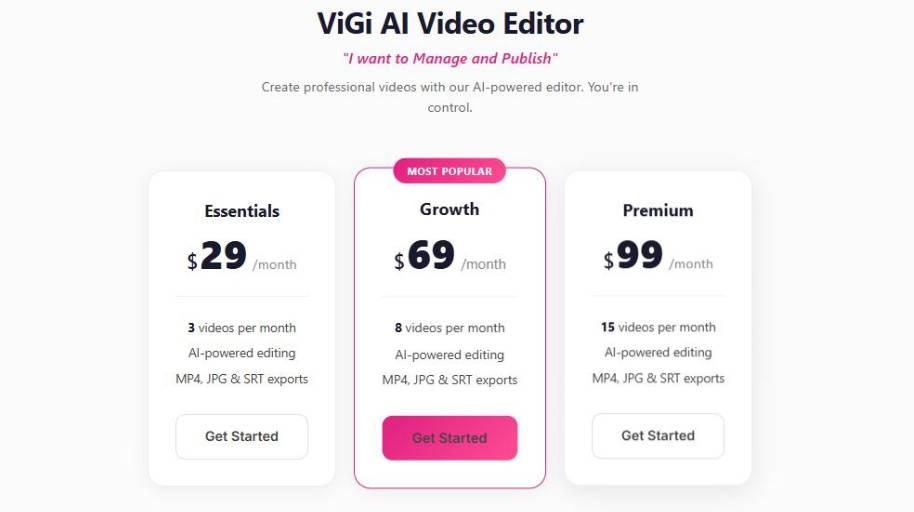
Vigi AI Video Generator Pricing
Vigi AI Video Generator Target Audience
Vigi is perfect for anyone who wants to produce video content for their business or content needs quickly and easily without extensive video editing experience. Here are the ideal candidates:
Small business owners and service providers
Many small business owners can’t or don’t have time to spend money on video production. Vigi helps them quickly and easily create video content from the content they already have on their website.
Digital marketers
Marketing professionals can use Vigi to create video content for advertising, social media, and other marketing needs. With the ability to quickly create videos based on a website address and easily customize them, this tool is ideal for anyone creating a lot of digital marketing content.
Content and social media marketers
Whether you’re trying to create regular content for Instagram, TikTok, YouTube, or your blog, Vigi can help you create content quickly and even includes options for voiceovers in different languages.
Content writers, marketing freelancers and agencies
If you’re looking to provide video content to your clients, you can use Vigi to quickly and easily create a wide variety of videos without needing to invest in video editing software. You can customize the videos for your clients and even use the videos as a base to further customize and edit.
SEO specialists and advertising specialists
If you specialize in search engine optimization or advertising, you can use Vigi to quickly create video content to accompany the written content you’re creating to improve watch time and engagement metrics.
Final Thoughts on Vigi AI Video Generator
All in all, Vigi is a user-friendly AI-powered video maker that does a great job in certain scenarios, and not so much in others. In the right context, it’s great at making it easy for people with limited editing experience to create videos.
Whether through auto-creating a video based on a website URL, or drag-and-drop video editing, and a video maker that guides users, it enables lots of different kinds of non-professionals to create a marketing or social video fast. That makes it great for turning existing content into video, and also for accelerating workflows when time is of the essence, and editing expertise is in short supply.
Meanwhile, if you need more from your video maker, it’s worth understanding where Vigi falls short. As with other automated video software, you can end up with results that feel a bit vanilla, or restricted to the constraints of a template, and with a relatively low level of customisation compared to a professional editor or a dedicated video creative agency. There are also some minor issues with bugs and maturity of features that some users have reported, which may impact larger or more complex video projects.
So, should you use Vigi? If speed and ease of use are the priorities for your video project, and you’re in a business or marketing context where you need to make lots of simple videos, Vigi is a good bet. But if you need a higher level of creative control, or you want to create a highly customised visual story, a traditional video editor, or a more advanced AI video maker platform may be more appropriate.


