

- High-quality raster-to-vector conversion
- Easy to use
- Multiple formats supported
- Consistent
- Lack of manual control
- Input image affects quality
- Not a graphics editor
Introducing Vector Magic AI Image Converter: What You Need to Know
It is a service that can be accessed online or on desktop that helps people who deal with graphic images get the high resolution scalable vectors they need. Most image file types such as JPEG and PNG are considered raster (or bitmap) images. Raster images are comprised of a series of pixels of color which create the appearance of an image when viewed at a specific resolution. When you zoom into the image it can become pixelated and blurry looking.
Vector images, on the other hand, are made up of a series of mathematical instructions which create shapes that make up an image. They are typically used in logos, icons, and other graphics because they don’t lose clarity when zoomed in and scaled up.
The problem is, getting a high quality vector image from a raster image can be difficult and time consuming, especially for the average person. Typically, to get the vector image you want, you would need to load the raster image into a program such as Adobe Illustrator or Inkscape and use the pen tool to trace the image, then adjust your settings until you have something that resembles your original image. It can take a lot of time and practice to master this process.
Vector Magic solves this problem by providing a simple online and desktop solution for converting your raster images into high quality vector images. All you need to do is upload your image to the Vector Magic tool and it will automatically convert it to a vector for you. Vector Magic will recognize the different shapes, colors, and lines in your raster image and use them to create vector shapes. The vector images can be exported as SVG, EPS, PDF, AI, and DXF file types. Vector Magic saves the user time and effort in trying to convert raster images to vectors.
It provides a simple and easy way for anyone, regardless of their design skills, to create high quality vectors from their favorite images.
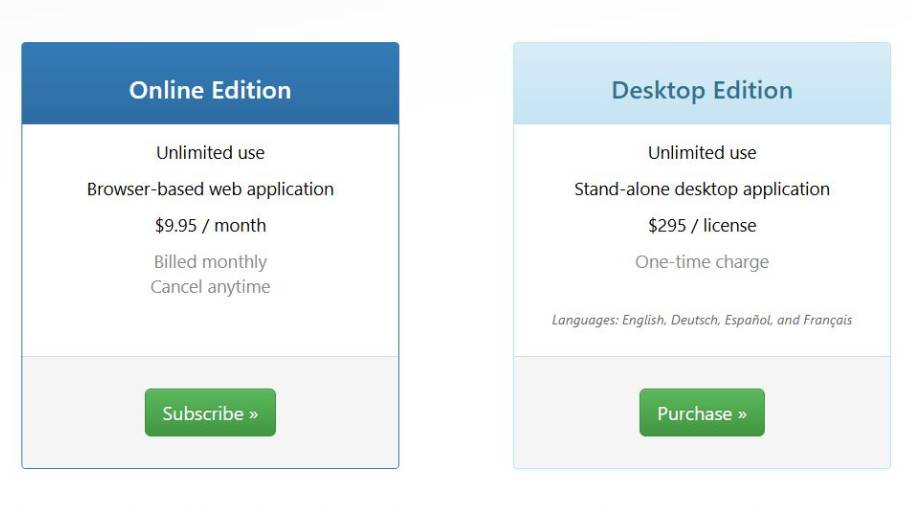
Vector Magic AI Image Converter Pricing
Is Vector Magic AI Image Converter Right for You?
Vector Magic is a great choice if you often find yourself wrestling with bad source material like web graphics, and need them to be good, scalable vectors. It’s not a design application; it performs one function, and performs it well – tracing bitmaps (JPG, PNG, GIF, etc) and producing vectors (SVG, EPS, PDF, etc) from them.
These are the users who experience the most overlap between their pain points and its key benefits:
1. So, you are asking, what do I do when logo designers do work with low res files?
Common problem: Clients provide logos in small JPG, screenshot or compressed PNG format without access to the original vector file. That can take hours to recreate.
Why Vector Magic makes sense:
- Can automatically find edges and regions of color.
- Generates print-ready scalable vector output
- Less need for tracing in programs like Illustrator
It comes in particularly handy when the logo is fairly simple (solid colors, sharp lines) and not already in a vector format.
2. Print Shops & Sign Makers
A classic issue: Customer’s artwork looks great on their monitor, but is blurry/pixelated when enlarged for use on a banner, t-shirt, or sign.
Why Vector Magic makes the cut:
- Converts your raster image to scalable vectors for large format printing
- Cuts clean, leaving a sharp edge for cutters and vinyl plotters
- And generate print ready outputs in standard formats.
For production environments where there are a large number of client documents being processed each day, this could dramatically save on preparation time.
3. Small Business Owners Who Don’t Have Access to Design Software
Common challenge: A company already has a logo, however the file was created years ago, they do not have any software or the contact details of the designer. They want to use the logo on packaging, promotional items, advertisements, etc.
How does Vector Magic do it?
- Available in web and desktop versions
- No coding or design experience needed
- Delivers prepared vector graphics
This enables organizations to innovate their legacy assets without having to go through a full design process.
4. Marketing teams: Reuse brand assets
Issue #1: Employees are often sizing down logos and icons for presentations, ads, trade show graphics, and social media. Raster files will become distorted when resized.
Why did we choose Vector Magic?
- Promotes efficient multi-channel scaling
- Edit shapes and colors after conversion
- Lower reliance on designers for small changes
It’s most effective with the source image when it has crisp lines and not too many gradients.
5. DIYers and Crafters with Die Cutting Machines
There are many people out there with Cricuts or similar machines, and they find clipart on the internet, but it’s a raster that you can’t cut well.
Why Vector Magic works:
- A tool for converting clip-art into SVG.
- Makes for neater cutting routes
- Reduces jaggedness
This simplifies the process of preparing designs for fabrication by eliminating the need to manually vector trace designs.
Who It’s Not Good For
And to keep me down-to-earth:
- Ultra-high-resolution images
- Gradients and textures
- When the illustrations demand detailed human manipulation
It can do those conversions, but might need a lot of tidying up afterwards.
The Bottom Line
When your objective is well-defined: converting a 2D, low-resolution image into a sharp, high-reolution vector file without much effort, Vector Magic is unbeatable.
If you’re someone who frequently has to recreate logos, or make designs print ready, or resize objects without losing resolution, then this is the tool for you.
Is Vector Magic AI Image Converter Worth Using?
The use of Vector Magic is best suited for people and companies that need to convert a lot of raster images to vector formats, but don’t have the time to do the tracing themselves. If you just need a logo, icon, or graphic that you need to blow up for print, a sign, a website, or to make a product, Vector Magic is the way to go.
If you need a full-fledged design application, or you need specific editing to your vectors, you will probably want to go with a professional graphics application, but for the simple conversion of a raster to vector, Vector Magic is perfect.