

- Edit video in context
- Camera positions, compositions and objects within a scene can be edited
- Text prompts flexibility
- Can change the lighting, mood or style of the whole clip
- Speeding up the editing process
- It may not be available to everyone.
- Inconsistent results
- Rendering time complications
- If you need to use this regularly, there will be a cost
- There may be a learning curve
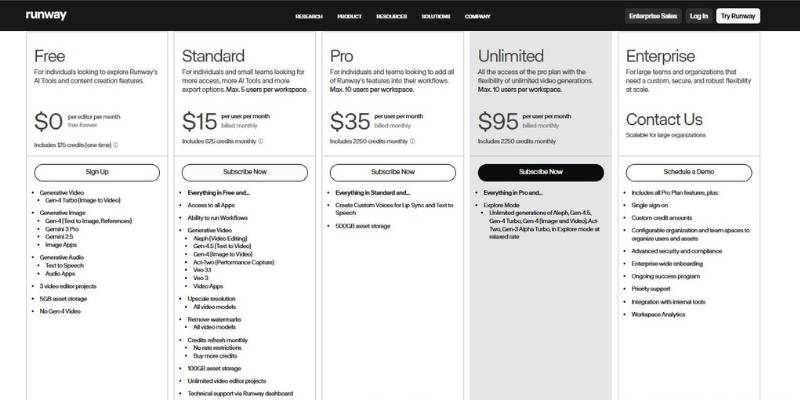
Runway Aleph AI Video Generator Pricing
Introducing Runway Aleph AI Video Generator: What You Need to Know
Runway Aleph falls under the umbrella of AI video tools like generative video tools. This suite of tools allows users to edit and generate video with AI, and takes us a step further away from using video editors like FCPX, Adobe Premiere, Avid, DaVinci Resolve and closer to using tools that actually transform video. Runway Aleph is built to take input video and apply an edit to that video based on a prompt.
Unlike some generative models that generate video from text, Aleph is a video-to-video model that means it applies an edit to an existing clip based on a prompt that you input. This allows the tool to understand the context of a scene and apply edits based on the context of the scene. Aleph is also a multi-task model that can do a lot of things at once and therefore can be used in one single interface to perform a variety of edits to a clip or set of clips.
Runway Aleph is a unique tool in the video generation and editing space. It’s not meant for just applying a template or filter to a video, but rather it is meant for applying complex edits to a video. The tool uses deep learning to apply spatial and temporal edits to a video, which means it can make changes to your video in space (like moving things around, or getting rid of things) and in time (like slowing down and speeding up). It also means you can do these edits in the same interface.
Historically you would have to use multiple tools to achieve this. Runway Aleph is a tool that can be used by anyone looking to apply edits to video, but likely has appeal to those in the film industry, or those creating a lot of video content.
Runway Aleph AI Video Generator in Real-World Scenarios
1. Filmmakers & Video Producers
Use Runway Aleph to edit a video in post-production, for example, changing the color of a car, removing a tree from a background, changing the lighting in a scene, or replacing an object, without the need to re-shoot.
2. Content Creators & Social Media Editors
Use Aleph to edit videos, for example, removing distracting objects, changing the style of a scene, or increasing the attractiveness of a video, in just a few words, making it easy to use for a quick turnaround.
3. Marketing & Brand Teams
Use Aleph to customize videos, for example, converting vertical videos to horizontal, changing the style of a video to fit the brand identity, or editing a video to test different versions of a scene.
4. Advertising & Creative Agencies
Use Aleph to make video editing more efficient, for example, editing a video to change an object’s color, removing objects in a scene, or testing different versions of a scene.
5. Post-Production Specialists & VFX Artists
Use Aleph as part of the post-production process, for example, to remove objects from a scene, relight a scene, or change the style of a scene.
6. Educators & Trainers in Media Technologies
Use Aleph as a teaching tool to demonstrate how AI can be used to edit videos, to train students on the technology, and to facilitate hands-on experiments.
7. Researchers in Computer Vision & Media Tools
Use Aleph as a research tool, for example, to test new interfaces for editing videos with an AI model, or to conduct experiments to understand how to better customize editing techniques.
Is Runway Aleph AI Video Generator Worth Using?
Ultimately, I believe that Runway Aleph is a powerful tool in the right context. It excels at making changes to existing content as opposed to generating completely new content from whole cloth, and I think it can be a huge time-saver for making things like lighting changes, object removal, object addition, etc. If your team could benefit from being able to turn around versions more quickly or just make the editing process more efficient, I think this tool could be really helpful in reducing the amount of time you need to spend in post-production.
However, I don’t think this tool is really meant to replace a full editing or visual effects workflow. I do think it’s meant to augment your process, even if that process is just you working alone. As with any AI tool, there are going to be times when the output doesn’t turn out exactly as expected, and while I think Runway has done a great job at developing this tool and continuing to improve it, I still believe that using Runway Aleph will require a good bit of testing and potentially re-rendering to get the results you want. I also think that render time, license availability, and potentially even cost could be prohibitive depending on the scope and timeline of your project.
If you’re someone who values being able to quickly and easily test out different versions and ideas, who needs to make a lot of edits to your footage to get the look you want, or someone who just wants to be able to leverage AI to make their job easier, faster and more efficient, Runway Aleph could be an excellent choice. However, if you need frame-accurate control over every part of your edit or visual effects process, or if you can’t afford to have any part of your process fail or need to be re-done, Runway may not be the best choice for you.


