

- Easy Video Creation
- Fast Video Creation
- Good-Looking Videos
- Online Platform, Nothing to Download/Install
- Free Version
- Limited (or no) Usage with Free Version/Cost Involved
- Inconsistent Results
- Limited Features
- Requires Good Prompts
MindVideo AI Video Generator Explained: A Quick Overview
MindVideo is an AI-powered video generation tool that allows you to create short videos using text descriptions or static images, without having to use a camera or editing software. It’s a tool that allows individuals and small teams to produce quick videos at an affordable cost. Here are some examples of use cases that apply to MindVideo:
Social media content creation Creators and influencers on social media use MindVideo to produce short engaging videos for platforms like TikTok, Instagram and YouTube. They describe the video in text, or upload an image and the AI creates a video that fits the social media format that people engage with. I’ve included this example because the end result is the ability to create engaging social media content.
Marketing and product videos Small businesses and e-commerce sites create promotional product videos to help sell their products. With MindVideo, they describe the product or upload an image and an automated video is produced. The video helps potential customers visualise the product, supports a sales funnel or can be used to adapt messaging in a different campaign. I’ve included this example because the end result is a video that helps the business.
Educational and explainer videos Teachers and instructors can upload their lesson script to the AI tool, which creates an animated video. This helps the student to understand a complex topic using moving images rather than text. I’ve included this example because the end result is an engaging educational video.
Animation from still photos and images Designers, artists and enthusiasts upload images to MindVideo to create animations from still photos. They describe what is happening in the image and the AI tool animates it. I’ve included this example because the end result is an animated image.
Rapid prototyping of video concepts Some film and video producers use the tool to create a rough storyboard video from a script. This helps them plan and refine the production process. I’ve included this example because the end result is a rough video prototype.
The above examples are good use cases for MindVideo because they involve producing an automated video from text or an image, which supports the end goal of the individual.
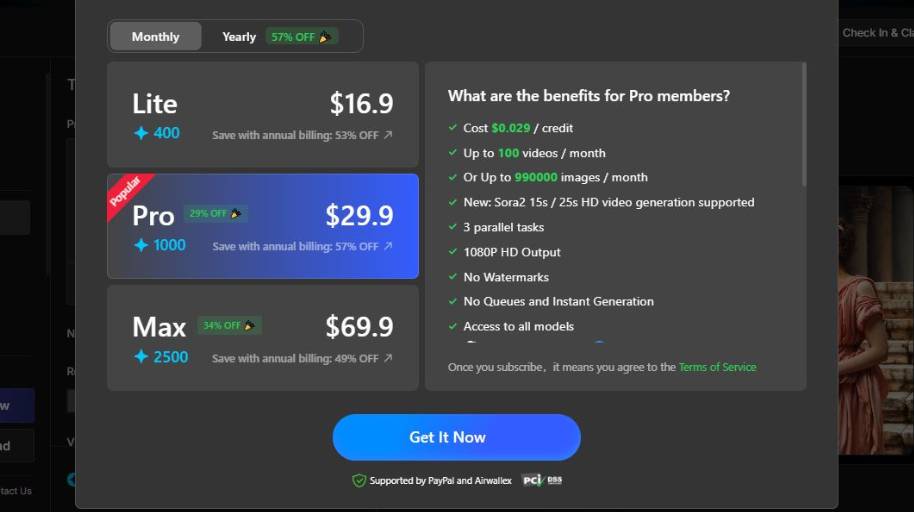
MindVideo AI Video Generator Pricing
Is MindVideo AI Video Generator Right for You?
Who is it for? MindVideo is perfect for individuals or groups who want to create short, shareable video versions of their ideas in a hurry, without having to rely on cameras or professional editing experience. It’s ideal for those who want to create a lot of content quickly and inexpensively, rather than having to micro-manage every single aspect of the video.
Good Matches
Content creators and social media users
If you upload short video content daily or weekly on TikTok, Instagram, or YouTube and are always looking to produce new content then MindVideo can aid in that. With the text-to-video and image-to-video features you can produce a video from an idea in a matter of minutes which makes it ideal for regular video production.
Small businesses and marketers
If you work in a small team without any in-house video team, it’s quite efficient to create a promotional video, product demo or social media ad. It’s quite useful if you need to deliver some messages or present products in a visual form but you are short of time and budget to engage an external production team.
Communicators and Educators
Educators offering online courses and digital tutorials might also benefit from it – for example, as a way to convert text-based slide materials, blog posts, or text outlines into a more visualized explanations. It could make it possible for anyone to create at least a storyboard (sort of) animation from a text (even without any video production experience)
Casual makers and hobbyists
If you want to create videos for personal use (like sending a birthday video to a friend) or for some creative fun (like making an animated GIF), then MindVideo is an accessible tool that requires no hardware or software investments.
When to Use Other Tools Instead
Pros: Professional video editing, film or higher level editing
If you’re an editor, filmmaker, producer or cinematographer and you have need for extensive cut editing, sound editing, motion graphics and multi-camera editing then you might want to use a dedicated editor such as Adobe Premiere, Davinci Resolve or an AI video editing platform with more extensive editing features which can also include more refined editing options.
Long-form or complex content
MindVideo is best suited for shorter-form content that requires rapid creation. If you are planning to create long-form content or need to control the continuity of scenes over a long time period, or if you need highly sophisticated character control and animation, it is generally best to create your content using a conventional workflow or a more advanced generative AI tool that allows scripting and staging.
Brand customization or corporate usage
For large companies with rigid brand style or high standards of quality, a platform that incorporates asset libraries, granular styling options, and collaboration tools designed specifically for corporate use cases might be ideal. Although MindVideo is capable of delivering high-quality content, it is an automated tool and may not satisfy every aspect of branding requirements.
MindVideo AI Video Generator Review Summary
AI video and text-to-image tools like MindVideo are popular and represent a huge portion of the generative AI market right now. In fact, there are many AI video tools online that operate in the browser that have similar goals and serve a range of markets, from social media content creators to digital marketers, teachers, and YouTubers. They allow you to create video from text, image, or other inputs, without the need to record a video or edit.
So, let’s talk about how MindVideo stacks up in the market and compare it to the other tools that are out there. Right now, there are a ton of browser-based video makers with templates that you can customize, as well as AI-powered tools that use text prompts and more. If you want to make a video fast, without too much effort, then MindVideo might be the tool for you.
There are a lot of MindVideo alternatives that offer better output resolution, templates, customization options, and more, depending on your needs.
If you are in the market for a MindVideo alternative, I hope that this review has been helpful in giving you some insight into your options.


