

Core Features and Capabilities of Humanize AI Text Humanizer
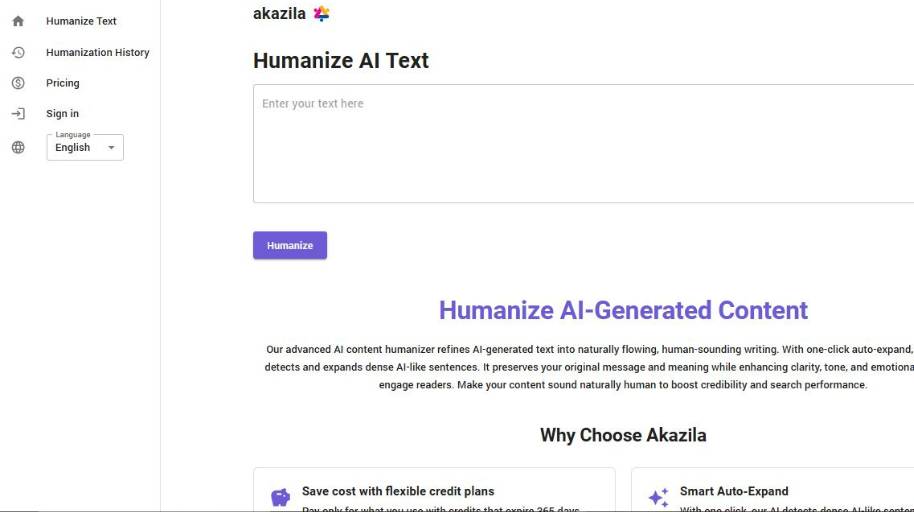
Humanize AI Text Humanizer Explained: A Quick Overview
Humanize AI is one of many AI tools in the market which are built to make AI content more human-like and natural. With AI tools now able to produce a text in a short amount of time, Humanize AI aims to humanize it to sound natural and conversational.
So, what is Humanize AI? Humanize AI is a part of text post editing and optimization tools. It doesn’t produce any content by itself, instead it edits and humanizes content which is generated by some other tool, or written by a human. It is the last step of content production.
How is Humanize AI different from other tools in the market? A lot of tools in the market try to offer the best quality, or optimize the content to rank in google, etc. Humanize AI, on the other hand, is focused only on making the content sound more natural and conversational. The end goal is for the content to sound as less formal as possible, remove any awkward phrases, etc.
When to use Humanize AI? You should use this tool whenever you want your content to sound more natural and conversational. The best use cases for this tool are when sending emails, personal messages, content which requires to sound more human-like, etc.
Humanize AI Text Humanizer Pros and Cons
- Great at removing robotic language
- Saves time on tone refinement
- Preserves the original intent
- Improved performance in multiple contexts
- Low effort, practical interface
- Context-dependent tone not adjusted
- May lose nuance in information-dense writing
- Not a full editing tool
Humanize AI Text Humanizer Comparison
| Aspect | Humanize AI | UnGPT | One Click Human | Rephrasy |
| Primary Role | Humanizes AI text to sound natural and readable | Humanizes AI text with added grammar and SEO refinement options | Converts AI copies to human-like text with one-click simplicity | Transforms AI text into natural writing |
| Ease of Use | Simple paste and humanize workflow | Can integrate as extension and humanize in place | Very quick one-click transformation | Straightforward input and output |
| Output Focus | Natural, conversational tone | Human-like text + grammar checks + SEO enhancements | Natural text with tone adjustments | Natural and engaging phrasing |
| Customization | Basic tone and flow adjustments | Broader editing options and extensions | Custom settings available for tone | Limited to rephrasing choices |
| Integration | Web tool via browser | Browser extension + web interface | Web interface tool | Web interface only |
| Ideal for | Quick naturalization of AI text | Writers who want humanization plus editing help | Users who want minimal steps to humanize | Users looking for basic humanization |
| Best Fit | Everyday content polishing | Content creators needing refinement + SEO | Fast conversion of AI drafts | Simple rewrite for natural tone |
What You Can Create with Humanize AI Text Humanizer

Rewrite AI-Generated Text
A lot of users get AI to generate initial text for them and then make it sound less robotic. With Humanize AI, AI-generated text can be rewritten to sound more human-like. This will allow the text to look like it was written, proof-read, edited, and then proof-read again before you publish it.
Academic Text
If you use AI to generate ideas for your papers or your thesis, or even if you use AI to create an outline for your academic texts, then you might want to make the text sound more human-like. Humanize AI can help you sound more human and less like you used a computer to generate text. This can be particularly useful in an academic setting where it is required to sound human and even more, to sound original and academic.
Blogging
If you generate blog posts, the text will need to sound more human-like in order to capture and maintain the interest of your readers. With Humanize AI, blog posts generated by AI can sound more human and be engaging for readers.
SEO Content
If you want to improve your website, it is vital to generate content that is unique. Humanize AI can help you sound more human-like in all the texts you generate with AI.
SEO Articles
For those who generate articles with AI, Humanize AI can make the articles sound more human and sound more interesting and original. Articles need to engage readers and with Humanize AI, they can.
Marketing and Sales
If you generate text for marketing and sales, it might need to sound more human. This can be particularly true for email marketing and copywriting. With Humanize AI, sales copy and marketing copy can sound more human and even more, sound more interesting and original.
Client Reports
Generating reports can be boring, however, it is quite simple to do so. With AI, you can generate reports for your clients. If you do so, Humanize AI can make the reports sound more human.
Proposal Writing
If you generate proposals with AI, then Humanize AI is the perfect tool for you. Proposals need to sound professional but also engaging and interesting.
Presentations
If you generate presentations with AI, Humanize AI can make your presentations sound more human. This can be particularly useful for business presentations.
Making Text Less Repetitive
If you use AI to generate text, then you might have come across repetitive text. If you did, then you will love Humanize AI. It can make repetitive text less repetitive.
Final Thoughts on Humanize AI Text Humanizer
Humanize AI offers a humanizing AI tool that optimizes the output of other AI text tools. You can think of it as a post editing tool that makes AI generated writing clearer, more natural and more conversational. In this post we’ve discussed how it compares to other AI humanization tools, where it performs in the real world and how its capabilities are best described as situational.
Its core benefits are clarity and tone, not changing the meaning of the text. It’s a great time saving tool for common content tasks like email writing, blogging, social media and business communication. It’s not a substitute for deep editing of technical or complex writing but it does support better communication.
If you are a consumer evaluating whether Humanize AI is right for you the basic answer is this. If you want to make AI writing sound more human and don’t want to spend a lot of time editing the content yourself, Humanize AI is a useful tool.


