

- Quick results to see how things look
- Fast and easy to use
- Easy to generate ideas for stuff
- Not having to generate art in one style
- Easy to generate stuff in many styles
- Can easily go back and change things
- Fast even for experienced artists
- No fine-grained control
- Can generate results that don’t make sense
- Inconsistent results for the same prompt
- Can be tricky to figure out how to use
- Takes good input image
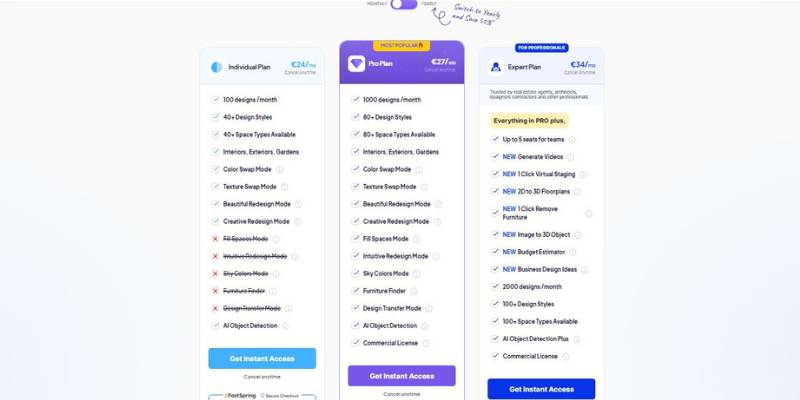
HomeDesignsAI Home Design Pricing
HomeDesignsAI Home Design Explained: A Quick Overview
You think it might be fun to design a house, but when faced with the practicality of it, it can be a nightmare. Most of us can’t imagine how that new sofa would look, or how the walls would look with a new coat of paint. We can’t envision a newly designed kitchen, or how that fresh new facelift on the front of the house would look. Calling a designer can be pricey and those fancy professional design programs are daunting to use.
Looking at inspiration pictures isn’t helpful as they are not YOUR living room or dining room. There isn’t one program that bridges that chasm between the here and now and the maybe. That is, until now. HomeDesignsAI solves that issue by allowing you to start from a photo. Rather than asking the user to build a room, the user uploads a photo of their living room, dining room, kitchen or exterior, and the AI returns the same space, just redesigned into the requested style. (ie, modern, mid-century, traditional etc.)
Here’s how it works: Take a photo of the space you want redesigned Choose the style or describe what you are looking for Get a newly designed version of that photo What’s important to note here is that the platform is not meant to replace the design process. It is meant to give the user the opportunity to play around with different designs before calling a designer. It’s for the person who wants to try out different options before committing to them. It’s for the person who wants to redesign a room but doesn’t know where to start.
Common Use Cases for HomeDesignsAI Home Design
HomeDesignsAI is designed to accommodate a variety of users based on the frequency and volume of their home designing activities. HomeDesignsAI serves different purposes within a workflow according to the level of use, which may be episodic, frequent, or enterprise-level.
1. Occasional Use (Individual Projects or One-Time Decisions)
Common users: Homeowners, renters, first-time renovators. How often: Occasionally — only as needed for projects like painting a room or buying new furniture.
Casual users will find that HomeDesignsAI is mostly useful for visualization and idea validation. Here’s how that process works:
- Take a picture of the room.
- Create multiple designs.
- Consider the different styles and try to make a decision.
- Draw conclusions from the results to inform purchases or remodeling.
At this tier, the tool lowers the risk of uncertainty for the user and prevents them from incurring the risk of an error. Instead of guessing, users can get instant visual feedback. The tool still remains relatively low in complexity and is not a part of a larger ecosystem (rather a standalone tool to explore an idea).
2. Frequent (Continuous Design Work or Clients)
Common users: Realtors, property managers, interior designers, builders. Frequency: Every week or month, and sometimes for multiple properties or spaces.
In daily practice, however, HomeDesignsAI is part of a routine process. It’s not used for a one-off decision, but for discussion and planning.
Common use case:
- Create staging ideas for listings.
- Show clients the options for the renovation prior to work.
- Test multiple design directions to align expectations early.
- Deliver visual mockups prior to finalizing a detailed technical design.
Speed and iteration is the priority here and not the production of a single artefact. The platform enables quicker client communication and can also reduce the number of iterations by defining visual expectations from the outset. It is not a replacement for drafting and project management tools.
3. Large-Scale Use (Portfolio-Level or High-Volume Operations)
Common clients: Real estate developers, contractors, portfolio marketers. Job volume: Fairly high, with multiple units/projects at a time.
At scale, HomeDesignsAI serves as a scalable visualization engine, where the objective is to optimize the operations rather than focusing on a single design choice.
Some potential workflow uses:
- Developing coherent designs schemes for different units.
- Marketing visual content for pre-renovation or pre-construction properties.
- Quickly testing different styles on different properties.
- Empowering the early stages of internal planning, ahead of full architecture planning.
So at this stage, there’s value in terms of standardization, there’s value in terms of speed, in the sense that you can kind of speed up early conceptual design work and reduce the amount of time to produce visual sketches, but you’re still at this stage, pretty much disconnected from technical documentation, from construction documentation, from cost estimating.
Workflow Positioning
Regardless of the level of the user, HomeDesignsAI is a high-level, ideation, and visualization tool, but not an architectural tool.
It lowers decision stress for casual users.
For regular users, it streamlines interaction and enhancement.
For big users, it helps to improve the speed and scalability in the early stages of design development.
That purpose grows as you use it more, but essentially it’s about helping you quickly get into image-based exploration of ideas at the outset, prior to technical phases of planning.
HomeDesignsAI Home Design Review Summary
HomeDesignsAI is meant to streamline your own home design process. Rather than having to mentally simulate an idea, you can use the space that you actually have. It’s also meant for users who don’t have a background in graphic design or an experience working with designing software. It’s all about streamlining the idea-gathering stage.
Throughout the article, we’ve covered a typical problem in the home design industry. Homeowners have a hard time visualizing a project before they dive into it. HomeDesignsAI solves this by providing a quick way to prototype an idea. We’ve explored areas where the tool excels (speed, user interface, and the ability to experiment with various designs) and where it falls short (slight inaccuracy and a lack of precision). We’ve also touched on various ways that the tool can be used, whether it’s for a one-time home design project, professional client work, or a series of property design projects.
Overall, the tool does an excellent job of allowing people to turn their visions into visualizations. It reduces the risk of experimenting with new ideas and makes decision-making less daunting. All of this can be done without having to have a technical background in design.
Ultimately, whether or not HomeDesignsAI is right for you will depend on your needs. If you’re looking for a tool that can help you better experiment with and visualize ideas, then it’s an excellent choice. If you need precise blueprints for architectural or construction purposes, then it’s better used as a preliminary tool to aid in the design process.