

- Quick script to audio time
- Simple, repeatable workflow
- Consistent voice output
- Fast revisions and updates
- Lower production costs
- Usable for the non-technical
- Occasional pronunciation issues
- Less emotionally varied than human narration
- Repetition in iteration
- Script dependency
Galaxy.ai Text to speech tool Explained: A Quick Overview
AI Text-to-Speech Galaxy.ai also provides an AI Text-to-Speech tool, which enables you to convert written text into an audio format. The process is simple: First, you input the text that you want to generate an audio version of. Second, you select a voice and settings that will determine the audio’s style. Next, you generate the audio.
This is where AI text-to-speech comes in: The text-to-speech engine, which relies on pre-trained speech models, converts the text into an audio waveform. Finally, you can review the audio, tweak the input or settings to achieve the desired outcome, and then export or download the audio file, which you can use for videos, podcasts, etc. As you can see, there is not much that a user can do while the AI text-to-speech tool is in action.
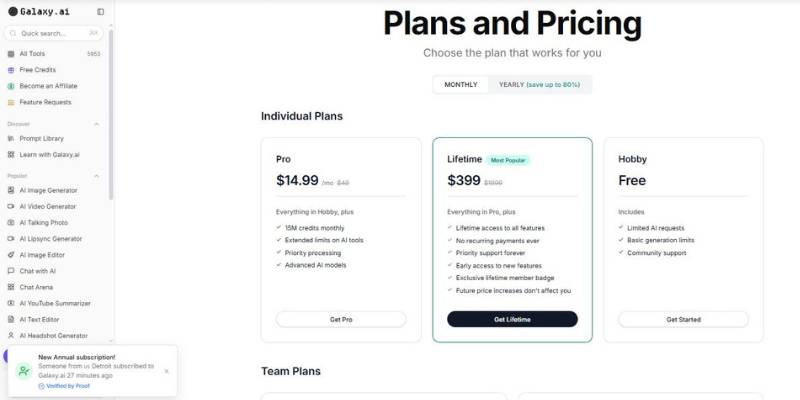
Galaxy.ai Development Tool Pricing
What You Can Create with Galaxy.ai Text to speech tool
Here are typical real-world problems that teams and creators encounter — and the practical results of solving them with Galaxy.ai as a text-to-speech solution.
1. Video Content Without a Voice Actor
The problem: A lot of YouTube creators and indie producers require a voiceover for their videos, explanations, ads, or films, but they do not have access to voice over artists, equipment, or even a recording studio. Scheduling the recording process can be a nightmare.
What it looks like with Galaxy.ai: They copy and paste their script, choose a voice, and create the voiceover in a matter of minutes. This means they can upload videos more quickly, keep their voiceovers consistent, and avoid issues with availability.
2. Inconsistent Training Materials
The problem: Many companies creating onboarding modules or compliance training hit a snag when they discover that their narrator sounds different when parts were recorded by different individuals. They also find that it’s expensive and timely to record updates.
Outcome with Galaxy.ai: Organizations can adopt a common tone & voice in all the modules. Any updates to the policies & procedures, they just need to update the script & re-generate the corresponding section, thereby keeping the courses up-to-date without having to re-record the entire course.
3. How to Scale Multichannel Marketing Content
The problem: Marketers often transform blog posts, landing pages, and campaign scripts into video or audio content. Having to record a voiceover for every version makes production more difficult and extends the time it takes to get campaigns live.
The outcome with Galaxy.ai: Content is easily translatable into voiceovers for social ads, sizzle reels, or promos. Content remixing becomes faster and teams can iterate more with different versions without the need for another VO session.
4. Accessibility and Inclusive Communication
The problem: Content on websites, in documentation, or in educational resources is not available to those who would prefer or benefit from an auditory experience. The manual production of audio requires extra effort.
What can you achieve with Galaxy.ai: Companies can easily convert text to speech to offer a better experience to their visually challenged audience or to people who like to listen instead of reading. This way you increase the accessibility of your content without adding much to your work.
5. Iterative Script Development While Productizing
The problem:When building app walkthroughs, prototypes or demos, product teams often need to iterate on their scripts. When using a traditional voiceover process, each iteration requires a new recording session.
The outcome with Galaxy.ai: Content teams can update the copy and remake the voiceover on the fly. This facilitates iterative collaboration and adapts to shifting product narratives.
6. How to Do Internal Comms with a Very Large Organisation
The problem: Businesses wanting to send an update, announcement, or educational content from one department to another may not have the resources to record high quality audio messages. Especially if your leadership team is very busy and don’t have time to record audio themselves.
The outcome with Galaxy.ai: Simple audio messages can be generated rapidly from scripts. It guarantees a professional communication and relieves leaders from repetitive recording processes.
7. Audio Production Costs
The problem: Voice over talent, studio rental and audio editing can get costly, which can be a major drawback for startups or small businesses that don’t have a lot of money to throw around.
After using Galaxy.ai: It saves on costs by digitally creating the voiceovers. You don’t need to spend money on hardware or studio rent to get quality voiceovers.
8. Converting blog posts or articles into audio versions or podcasts
The problem: Writers who create blog posts and other articles might want to create an audio version, but they don’t have the time to read and record every article themselves.
Benefits with Galaxy.ai: Content creators can easily transform their text content into audio form, enabling them to leverage new ways of sharing content and connect with their audience who’d prefer listening.
Galaxy.ai Text to speech tool Review Summary
Here’s the truth. Galaxy.ai is the right tool for you if you need quick, simple, scalable voiceovers for your videos or if you need to produce a lot of content and if you need it to sound consistent. For example, you need Galaxy.ai if: It’s great for corporate videos, explainers, tutorials, etc.
You need Galaxy.ai if:
- You need to make changes to your content all the time.
- You need a consistent sound across all of your videos.
- You don’t have time, resources or budget to record a voiceover.
- You need to automate this process.
- You don’t need super high quality (emotional, acted out) voiceover.
But if your content heavily relies on the emotional and acted out voiceover, then Galaxy.ai might not be the best fit for you. At least not yet.
For example, if you create cinematic stories, animations, you need custom voice acting or other customizations such as advanced audio editing capabilities or you need a very specific language support, then you might need to consider other options.
My advice to you is simple. Define what type of content you create, how often you need to make changes to it, how much time you have and what resources you have at your disposal.
If you need something fast, simple and consistent, then Galaxy.ai is the right choice.


